
Intellectual Property
Hot selling product recommendations
View More



















When Ports Refuse to Cooperate: The Cisco N9K-C9336C-FX2 Experience
If you've ever stared at a network switch wondering why port Eth1/30/3 stays stuck in "Initializing" state for hours, or watched subinterface counters stubbornly display zeros while traffic flows normally, you've encountered the kind of quirks that make real-world networking both frustrating and fascinating. The Cisco N9K-C9336C-FX2 has its share of these moments—those peculiar behaviors that don't show up in marketing brochures but become part of daily operations for network engineers.
This 1RU workhorse sits at the heart of modern data center fabrics, designed to handle the brutal demands of cloud-scale traffic. With 36 QSFP28 ports staring back at you, it promises 100G connectivity to everything that matters in your infrastructure. But like any complex piece of engineering, it comes with its own personality and peculiarities.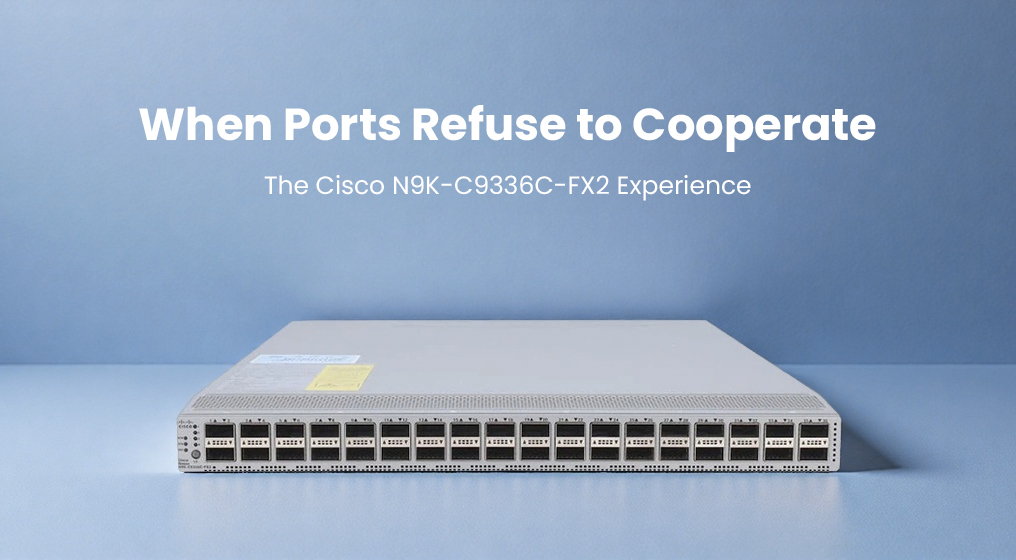
Let's start with what this switch actually does. The 9336C-FX2 serves as either a leaf or spine in Cisco's Application Centric Infrastructure (ACI) fabric, though it's equally comfortable running traditional NX-OS. Those 36 ports aren't just for show—they're your highway for east-west traffic between servers, storage arrays, and hypervisors. In practical terms, this means connecting GPU clusters for AI workloads, linking virtualization hosts in private clouds, or forming the backbone of a high-frequency trading network where microseconds matter.
The numbers tell part of the story:
|
Specification |
What It Means |
|---|---|
|
Port Configuration |
36 × 40/100G QSFP28 |
|
Switching Capacity |
7.2 terabits per second |
|
Forwarding Rate |
2.8 billion packets per second |
|
System Memory |
24 GB |
|
Storage |
128 GB SSD |
|
Buffer Size |
40 MB |
|
CPU Cores |
4 |
|
Form Factor |
1RU (1.72" × 17.3" × 24.5") |
|
Power Supplies |
Dual 750W/1100W (hot-swappable) |
|
MTBF |
352,590 hours |
Physically, the switch presents a clean, industrial aesthetic. The front panel is dominated by those 36 QSFP28 ports, with ports 1-6 and 33-36 having some special characteristics worth noting. The rear houses three fan modules that come in either blue (port-side exhaust) or burgundy (port-side intake) variants, plus your dual power supplies. At around 27 pounds, it has that satisfying heft of enterprise-grade hardware.
Where the FX2 truly shines is in its flexibility. Every port supports breakout configurations—you can turn a single 100G port into four 25G or four 10G connections, giving you up to 144 lower-speed ports if needed. Ports 31-34 can be converted from fabric links to downlinks, though this requires a reboot. The hardware supports MACsec encryption across all ports, providing line-rate security without performance penalties.
Now, about those quirks. Ports 1-6 and 33-36 have limitations with 1G QSA adapters—they simply won't work. If you're using older switches, auto-negotiation might fail on port Eth1/4. When applying breakout configurations to multiple ports simultaneously, be prepared to wait up to 10 minutes while the hardware programs itself. And if you're monitoring subinterface traffic, you might find counters showing zeros even when packets are flowing—a known issue that requires specific hardware profile commands to resolve.
From an operational perspective, the FX2 offers both rewards and challenges. The dual-mode operation (ACI or NX-OS) means you can start with traditional networking and transition to policy-based automation without changing hardware. The comprehensive telemetry through NetFlow and ERSPAN gives you visibility into traffic patterns, though the 40MB buffer can feel tight during traffic bursts. Management is straightforward through both CLI and web interface, though the traditional menu layout lacks the smart navigation found in newer models.
When it comes to value, the FX2 sits in an interesting position. It's not the newest model—the FX2-E variant offers larger TCAM, faster storage, and enhanced features—but for many deployments, it provides 90% of the functionality at a significantly lower cost point. The real savings come in operational efficiency: the ability to handle both traditional and ACI environments means you don't need separate hardware for different use cases. Over a typical 5-year lifecycle, the reduced rack space, power efficiency, and operational simplicity often justify the investment.
The strengths are clear: exceptional port density in a 1RU form factor, flexible speed configurations, solid performance for most workloads, and integration with Cisco's broader ecosystem. The weaknesses are equally apparent: limited buffer size for bursty traffic, some port restrictions with certain adapters, and the learning curve associated with ACI if you're coming from traditional networking.
Compatibility is where Cisco's ecosystem shines. The FX2 plays nicely with other Nexus switches, integrates with DNA Center for centralized management, and supports the full range of Cisco transceivers and cables. For organizations already invested in Cisco infrastructure, the integration is seamless. The switch also supports VXLAN/EVPN for network virtualization, making it suitable for multi-tenant environments.
Software support follows Cisco's standard lifecycle, with NX-OS releases typically receiving updates for 5-7 years. The switch supports in-service software upgrades (ISSU), allowing you to update firmware without taking the entire fabric offline. Regular security patches and feature updates keep the platform current, though some organizations find the pace of ACI updates challenging to keep up with.
What you're really getting with the 9336C-FX2 is a proven platform that handles the heavy lifting of modern data center networking. The occasional quirks—like ports taking 5-14 seconds to come up with certain optics, or the need to carefully plan breakout configurations—are manageable once you understand them. For teams building cloud-scale infrastructure, supporting AI/ML workloads, or modernizing legacy data centers, this switch provides a solid foundation that balances performance, flexibility, and cost.
The true measure of any network device isn't how it performs in lab tests, but how it holds up under production loads while you're dealing with a dozen other fires. The FX2 generally passes this test, offering enough headroom for growth and enough stability to let you focus on delivering services rather than babysitting hardware. In the end, that's what matters most—a switch that does its job reliably, even if it occasionally makes you scratch your head.