The Silent Panic When Your FPR4110-NGFW-K9 Won't Boot: A Real-World Look at Cisco's Mid-Range Workhorse
It starts with a quiet hum in the server room, then suddenly, nothing. The status LEDs on the front panel of your Cisco
FPR4110-NGFW-K9 turn an alarming amber, or worse, stay dark. For many network administrators, this specific model has become both a reliable guardian and, occasionally, a source of late-night anxiety when the FXOS chassis fails to initialize or the SSD throws a fit. This isn't just about a piece of hardware; it's about the moment your organization's digital perimeter goes silent. While the FPR4110 is often praised for its modular design, real-world deployment reveals a complex mix of impressive throughput and specific quirks that every buyer should know before signing the purchase order.
At its core, the
FPR4110-NGFW-K9 is designed to sit squarely in the mid-range enterprise segment, acting as a robust next-generation firewall (NGFW) for medium-sized data centers or large branch offices. Unlike its smaller siblings in the 2100 series, the 4100 platform brings a level of modularity previously reserved for high-end gear. It runs on the Firepower eXtensible Operating System (FXOS), which acts as the underlying chassis manager, allowing you to instantiate logical devices like Firepower Threat Defense (FTD) or even the classic ASA software. This flexibility means the box can evolve with your security strategy, shifting from a pure firewall to a comprehensive threat defense hub without needing a hardware swap. However, this power comes with a learning curve; managing the separation between the FXOS layer and the logical security device can trip up admins used to simpler, monolithic systems.
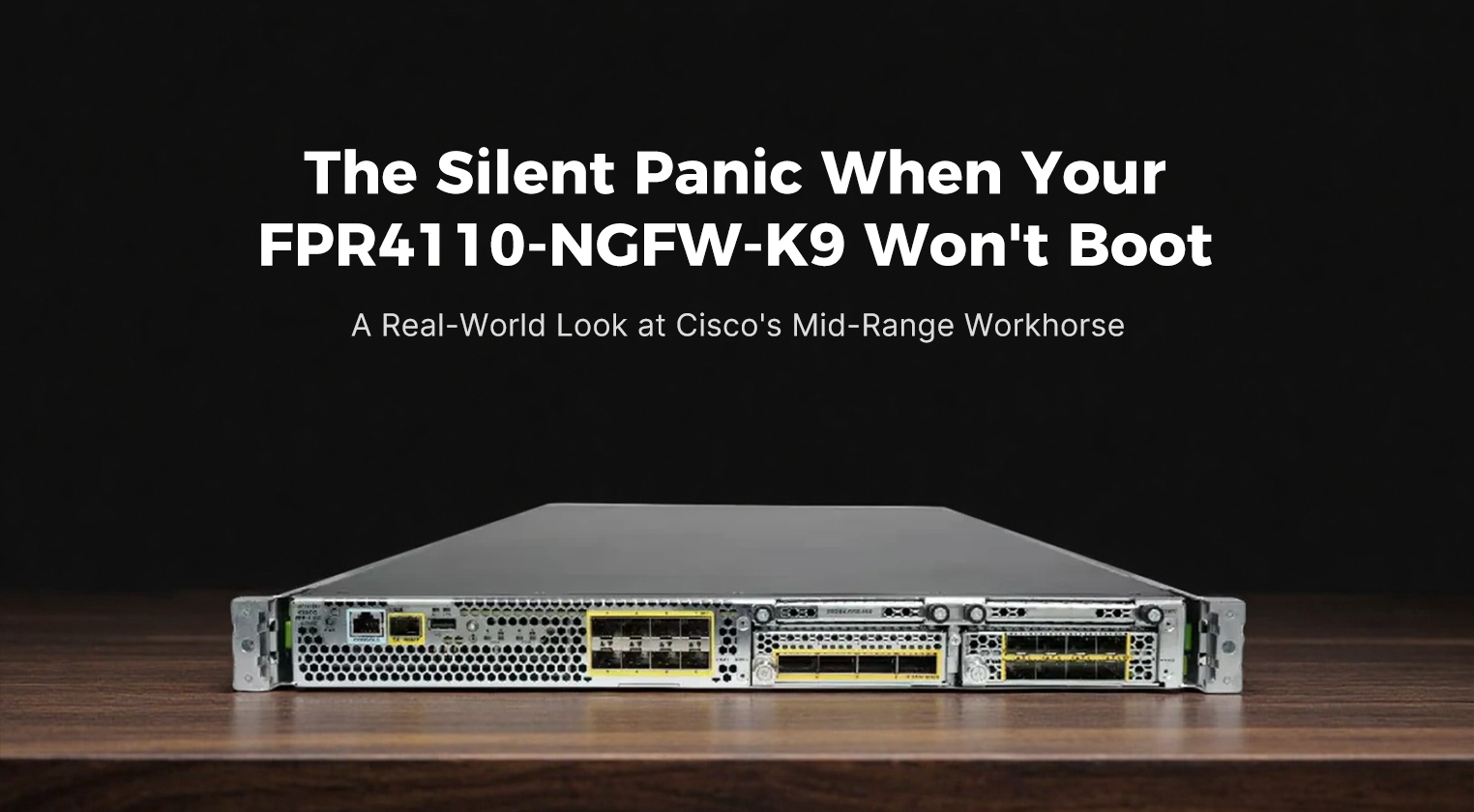
When you pull the FPR4110 out of the box, the first thing you notice is its industrial, no-nonsense aesthetic. It’s a standard 1U rack-mountable unit, but it feels denser and more substantial than typical 1U appliances. The front panel is dominated by two network module bays, which are the heart of its flexibility. Depending on how you configure it at the time of order, these bays might be filled with a mix of SFP+ ports for 10 Gigabit connectivity or QSFP+ ports for 40 Gigabit uplinks. To the right, you’ll find the system status LEDs, a USB port for local storage or recovery, and the console port. The airflow design is strictly front-to-back, aligning perfectly with modern hot-aisle/cold-aisle data center layouts, ensuring that heat doesn’t recirculate and cause thermal throttling. It’s not a beautiful device in the consumer sense, but it exudes a kind of rugged reliability that fits well in a professional server rack.
The real story, however, lies in the numbers. The FPR4110 is not just a packet filter; it’s a inspection engine capable of deep packet analysis without bringing your network to a crawl. Below are the core specifications that define its capabilities:
| Parameter |
Specification Details |
| Model |
Cisco Firepower 4110 (FPR4110-NGFW-K9) |
| Form Factor |
1U Rack Mount |
| Firewall Throughput |
Up to 35 Gbps |
| NGFW Throughput |
Approx. 10–12 Gbps (with full security services enabled) |
| IPS Throughput |
Approx. 10 Gbps |
| Concurrent Connections |
Up to 20 Million |
| New Connections Per Second |
Up to 60,000 |
| Network Interfaces |
Modular: Up to 24x 10G SFP+ or 8x 40G QSFP+ (depending on network modules installed) |
| Management Ports |
1x 1G RJ-45 Management, 1x RJ-45 Console, 1x USB 2.0 |
| Storage |
Dual SSDs (typically 400GB or 800GB, configurable) for logging and OS |
| Processor |
Multi-core Intel Xeon architecture (specifics vary by revision) |
| Memory |
Typically 64GB DDR4 RAM (expandable in some configurations) |
| Power Supply |
Dual redundant AC power supplies (hot-swappable) |
| Operating System |
FXOS Chassis Manager + FTD or ASA Logical Device |
Performance in the field generally matches these specs, provided the system is tuned correctly. Users report that with all security features—such as intrusion prevention, malware detection, and URL filtering—turned on, the device sustains multi-gigabit speeds easily. This makes it ideal for environments where bandwidth is plentiful but security cannot be compromised. The modular nature of the ports means you aren’t stuck with a fixed interface layout; if your network grows from 1G to 10G or even 40G, you can often just swap the network modules rather than replacing the entire chassis. This future-proofing is a significant selling point for IT directors watching their capital expenditure budgets.
Functionally, the FPR4110 shines in its ability to provide granular visibility into network traffic. It doesn’t just block bad actors; it tells you who they are, what applications they are using, and where they are trying to go. Integration with the Cisco Secure Firewall Management Center (FMC) allows for centralized policy management across hundreds of devices, creating a unified security posture. The system supports advanced features like SSL decryption, which is crucial for inspecting encrypted traffic, though this does come with a performance cost that needs to be accounted for during sizing. Furthermore, the support for clustering allows multiple FPR4110 units to work together as a single logical device, providing both scalability and high availability. If one unit fails, the others pick up the slack seamlessly, ensuring business continuity.
However, the user experience is not without its friction points. The very complexity that makes the FPR4110 powerful can also make it frustrating. Initial setup requires navigating two layers of configuration: the FXOS chassis setup and the logical device (FTD) configuration. Newcomers often find themselves stuck in the FXOS CLI, wondering why their interfaces aren’t showing up in the FTD GUI. There have been documented issues with SSD recognition, where certain drives might report incorrect capacities or fail to format properly, requiring firmware updates or even hardware replacement. Additionally, boot times can be lengthy; after a reboot, it’s not uncommon to wait ten to fifteen minutes for the chassis to initialize, the logical device to load, and the policies to apply. For admins used to instant-on appliances, this delay can induce unnecessary panic during maintenance windows.
Despite these hurdles, the value proposition of the
FPR4110-NGFW-K9 remains strong. When compared to competitors in the same price bracket, it offers a unique blend of hardware flexibility and deep software integration. The ability to switch between FTD and ASA software images on the same hardware protects your investment against shifts in security strategy. While the upfront cost is higher than entry-level firewalls, the total cost of ownership over five years is often lower due to its longevity and modular upgrade path. You aren’t buying a static box; you’re buying a platform that can adapt. For organizations that need more than basic filtering but aren’t ready for the expense and complexity of the 9300 series, the 4110 hits a sweet spot.
Of course, no product is perfect. The pros are clear: exceptional throughput for its class, modular interface options, dual-SSD redundancy, and the robust Cisco ecosystem support. The cons, however, are equally notable. The learning curve for FXOS is steep, the boot times are slow, and the licensing model for advanced features like Threat Intelligence and URL Filtering can add up quickly, sometimes catching buyers off guard. There are also occasional teething problems with firmware upgrades, where compatibility between the FXOS version and the FTD version must be meticulously checked to avoid bricking the logical device. Some users have reported fan noise levels that are higher than expected for a 1U device, which might be a concern in quieter office environments or small server closets.
In terms of real-world reliability, the FPR4110 has proven to be a sturdy soldier. Once configured and stabilized, it tends to run for months without intervention. The common boot issues or SSD glitches usually surface during initial deployment or major upgrades, rather than during steady-state operation. The community and Cisco TAC support are generally responsive, with a wealth of documentation available to troubleshoot the inevitable hiccups. For the experienced network engineer, these challenges are manageable obstacles rather than deal-breakers. For the novice, they might represent a significant hurdle requiring external consultancy.
Ultimately, the Cisco
FPR4110-NGFW-K9 is a device that rewards competence. It doesn’t hold your hand, but it gives you the tools to build a formidable defense. Its performance metrics stand up well against modern threats, and its modular design ensures it won’t become obsolete the moment your network speeds increase. While it may not be the simplest firewall to deploy, its balance of power, flexibility, and long-term viability makes it a compelling choice for enterprises serious about security. If you can navigate the initial complexity and keep your firmware meticulously updated, the FPR4110 will likely serve as the silent, steadfast guardian of your network infrastructure for years to come, turning that initial panic of a blinking amber light into a rare occurrence rather than a routine event.