Sixty Gigabits of Anxiety: My First Year Behind the Cisco FPR-4120-K9
The license activation failed on a Friday afternoon. That is how my relationship with the
FPR-4120-K9 began. I had spent three days cabling this thing, routing fiber through the vertical managers, double-checking every SFP+ module for compatibility, and when I finally powered it on and tried to register the smart license, the firewall management center just showed a red X next to the throughput entitlement. For someone who had spent the better part of a decade working with ASA appliances, this was a new kind of frustration. The
FPR-4120 does not behave like traditional Cisco security gear. It runs FXOS underneath, which manages the chassis, and then you layer FTD or ASA on top of that. Two operating systems, two configuration models, and twice the opportunities for something to go wrong. That Friday taught me more about this platform than any datasheet ever could.
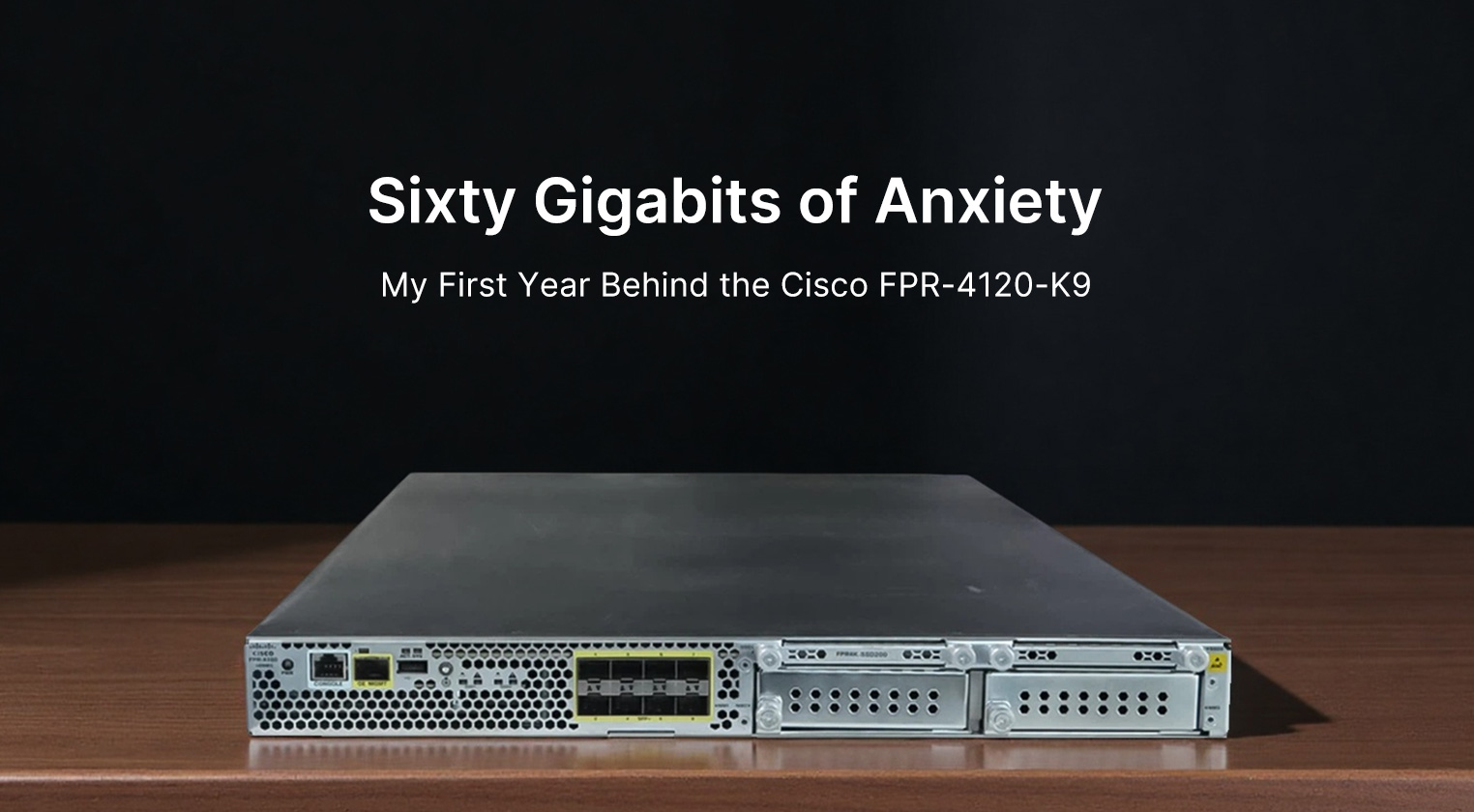
Physically, the 4120 is deceptively compact. It slides into a single rack unit, which makes you forget how much hardware is packed inside. The front panel has eight fixed SFP+ ports that glow with that familiar green link light, plus two empty slots for network modules if you need more density. We eventually populated those slots with 40Gb QSFP+ modules for our data center interconnect, which gave us the flexibility to grow without replacing the entire chassis. The build quality feels solid. The chassis is heavy enough that you do not want to rack it alone, and the rail kit locks in with a satisfying click that suggests this equipment was designed to stay put. Airflow moves front to back, which matches our data center layout, but the fan noise is noticeable. Not alarming, but present. During quiet maintenance windows, you can hear it humming from the aisle. The power supplies are redundant and hot-swappable, which I have only tested once when one started reporting voltage fluctuations. Replacement took about ten minutes, and the chassis never blinked. That kind of reliability is why you pay the premium.
Performance is where the 4120 justifies its existence in the network. We pushed it through a migration that consolidated three older ASA 5585-X units into this single chassis, and the throughput headroom was immediately apparent. With all the threat defense features enabled—IPS, malware inspection, URL filtering, SSL decryption—the box still handled our peak traffic without breaking a sweat. I remember watching the dashboard during a DDoS attempt that would have saturated our old firewalls. The 4120 absorbed the burst, logged the attack signatures, and kept forwarding legitimate traffic. The CPU utilization stayed under 40 percent. That is the benefit of the hardware-accelerated architecture. The data plane does not wait for the control plane to make decisions. Packets move through the inspection engines at line rate, and the system only interrupts the processor when it needs to establish a new connection or apply a complex policy. This separation is not new to the industry, but experiencing it firsthand changes how you think about capacity planning.
| Specification |
Detail |
| Model |
Cisco Firepower 4120 (FPR-4120-K9) |
| Rack Units |
1 RU |
| Fixed Ports |
8 x 1/10Gb SFP+ |
| Module Slots |
2 network module slots |
| Max Interfaces |
Up to 24 x 10Gb SFP+ or 8 x 40Gb QSFP+ |
| Firewall Throughput |
Up to 60 Gbps |
| IPS Throughput |
Approximately 30 Gbps |
| Operating System |
FXOS with FTD or ASA application |
| Power Supply |
Dual redundant AC/DC (hot-swappable) |
| Fan Module |
Single field-replaceable tray |
| Management Ports |
1Gb MGMT, RJ-45 Console, USB 2.0 |
| Memory |
Fixed per SKU (typically 32GB+ DRAM) |
| Storage |
Internal SSD for logs and system |
| Rack Depth |
Approximately 75 cm |
| Weight |
Around 16 kg |
The user experience is where things get complicated. FXOS is not IOS. It is not even IOS XE. The command structure is different, the package management is different, and the way you apply policies requires a shift in thinking. Firepower Management Center becomes your primary interface for security policies, which means you are managing the firewall through a separate appliance or virtual machine. This separation makes sense for large deployments where you want centralized control, but for a single chassis, it feels like overhead. I have spent hours troubleshooting why a policy did not apply, only to discover the management center had not successfully pushed the configuration. The device itself was fine. The communication layer between management and device was the problem. These are the kinds of issues that do not show up in lab testing. They only appear when you are responsible for keeping production traffic moving.
There are also licensing complexities that caught me off guard. The smart licensing model is flexible once you understand it, but the initial setup requires connectivity to Cisco's licensing servers, which is not always straightforward in segmented networks. We had to configure a proxy specifically for license registration, and even then, the entitlements did not sync correctly for the first week. Support was helpful, but the back-and-forth consumed time I did not have. The throughput license is particularly important. You can have the hardware capacity, but without the correct license level, the system throttles itself. I have seen this happen during an audit when someone realized we were running below our licensed throughput. It is a compliance issue as much as a technical one. Planning your license levels requires forecasting traffic growth, which is never an exact science.
From a maintenance perspective, the 4120 is well-designed. The fan tray slides out from the front without tools. The power supplies are accessible. The SFP+ modules lock securely but release cleanly when you need to swap them. I have replaced optics, network modules, and power supplies without scheduling downtime. That is the kind of operational flexibility that matters when you are supporting a 24/7 environment. However, firmware upgrades require planning. You cannot just upload a binary and reboot. The FXOS layer needs to be upgraded separately from the FTD application, and the compatibility matrix between the two is strict. Get it wrong, and you spend hours recovering. We learned to test every upgrade in a lab environment before touching production. That extra step has saved us from potential disasters more than once.
The value proposition depends on your use case. For a service provider or large enterprise needing high throughput with advanced threat protection, the 4120 sits in a reasonable position. It is more expensive than the 2100 series but offers significantly more capacity. It is less expensive than the 4140 or 4150 but may lack the headroom for future growth. The total cost includes not just the hardware but also the management center, the licenses, and the support contract. When you add all of that together, the investment is substantial. But compared to running multiple smaller firewalls in a cluster, the operational simplicity often justifies the cost. Fewer devices mean fewer failure points, fewer configurations to maintain, and fewer licenses to track. The consolidation benefit is real, even if the upfront price makes the finance team pause.
The advantages are clear once you move past the initial learning curve. The throughput is genuine. Many vendors advertise numbers that assume no security features are enabled. The 4120 delivers its rated performance with IPS and malware inspection active. The modularity allows you to adapt the interface density as needs change. The FXOS architecture provides a stable foundation that separates chassis management from security functions. The threat intelligence from Talos integrates seamlessly, giving you protection against emerging threats without manual signature updates. The clustering capability means you can scale horizontally if a single chassis becomes insufficient. These are enterprise-grade features that justify the platform's position in the market.
The disadvantages are equally real. The management complexity is the biggest hurdle. Firepower Management Center adds a layer of abstraction that can obscure what is actually happening on the device. Troubleshooting requires checking multiple interfaces—the FXOS CLI, the FTD CLI, and the management center GUI. Each shows different information, and correlating them takes experience. The licensing model is opaque until you have navigated it a few times. The initial cost is high, and the ongoing license renewals add to the total ownership expense. The fan noise and heat output require proper data center infrastructure. You cannot deploy this in an office wiring closet. The learning curve for teams accustomed to traditional ASA is steep. There are enough differences that retraining is necessary, not optional.
After a year of operation, the 4120 has become the backbone of our security perimeter. The Friday license panic is a distant memory. The system runs quietly in the background, inspecting traffic, blocking threats, and logging events for analysis. I still check the dashboard daily, but the anxiety has faded into routine confidence. When I see the throughput graphs staying well below the licensed maximum, I know we have headroom for growth. When the threat logs show blocked attacks that never reached our servers, I know the investment is paying off. The 4120 is not perfect. No security appliance is. But it does what it promises. It protects the network without becoming the bottleneck. And in a world where security teams are constantly asked to do more with less, that reliability is worth the complexity. The license activation failed on a Friday. But by Monday, it was working. And for the past year, it has not failed since. That is the metric that matters.