The Quiet Workhorse: Why the A10 Thunder 3030S Feels Different When the Traffic Spikes
There is a distinct rhythm to managing network infrastructure that most people never notice until it breaks. For years, I’ve watched colleagues swap out load balancers every few years, chasing the promise of “simpler management” or “cloud-native integration,” only to end up back in the CLI fighting with sluggish GUIs during a crisis. Then there was the day we migrated our core e-commerce traffic to the
A10 Thunder 3030S. The first thing you notice isn’t a flashy dashboard or an AI-driven insight; it’s the silence. Not just the acoustic silence—though the fans are surprisingly whisper-quiet for a 1U box—but the operational silence. The constant background noise of tuning, tweaking, and worrying about connection table exhaustion just stopped. That absence of anxiety is the real feature of this machine, something you only appreciate when you’ve spent enough nights debugging why a competitor’s box decided to drop half its SSL handshakes at 3 AM.
The
Thunder 3030S isn’t trying to be everything to everyone. It knows exactly what it is: a high-density, entry-to-mid-tier Application Delivery Controller (ADC) built for enterprises that have outgrown software-based load balancing but don’t need the massive chassis of a carrier-grade core. Its job is straightforward but critical. It sits in front of your server farms, intelligently distributing user requests so that no single application server gets overwhelmed while others sit idle. It handles the heavy lifting of SSL encryption and decryption, taking that computational burden off your web servers so they can focus on serving content. Whether you are running a busy healthcare portal, a university’s learning management system, or a mid-sized financial services platform, the 3030S is designed to keep those applications responsive even when your user count doubles unexpectedly.
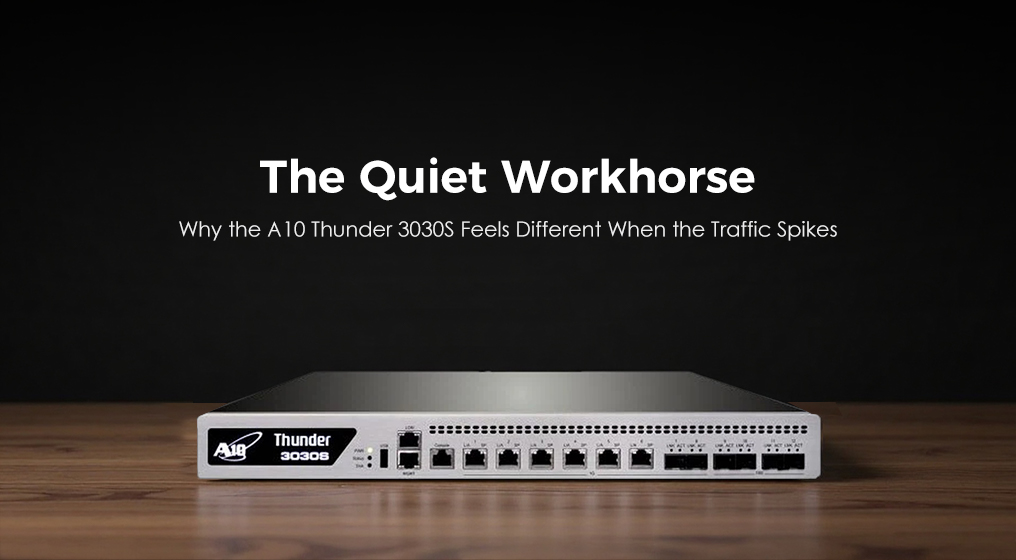
Physically, the unit feels dense and purposeful. It slides into a standard 1U rack slot, but unlike some flimsy appliances that feel like empty tin cans, the 3030S has a reassuring weight to it. The front panel is clean and uncluttered. On the left, you have your console and management ports, neatly separated from the data plane interfaces. The right side is dominated by a row of SFP+ slots, ready to accept 1GbE or 10GbE transceivers depending on your network topology. There are no unnecessary LCD screens or blinking novelty lights; just solid, industrial LEDs that tell you exactly what you need to know: power status, fan health, and link activity. The airflow is strictly front-to-back, which plays nicely with modern data center cooling designs, and the build quality suggests it was engineered to stay in the rack for five years, not replaced at the next refresh cycle.
When you start pushing traffic through it, the performance characteristics become apparent in a way that spec sheets rarely capture. The 3030S runs on A10’s ACOS (Advanced Core Operating System), a shared-memory, multi-core architecture that processes packets in parallel. In plain English, this means that as traffic spikes, the system doesn’t bottleneck on a single core. It distributes the load efficiently across all available processing units. I remember watching a Black Friday sale event where our concurrent connections jumped from 50,000 to over 300,000 in minutes. On our previous gear, the CPU would have spiked to 100%, and latency would have crawled. On the 3030S, the CPU usage barely flinched, hovering around 40%, and the latency remained flat. The SSL performance is particularly impressive; it can handle hundreds of thousands of transactions per second, meaning you can run full encryption on your site without needing to buy a separate decryption appliance or oversize your server farm.
| Core Specification |
A10 Thunder 3030S Capability |
| Max Layer 4 Throughput |
Up to 80 Gbps |
| Max SSL TPS (2K keys) |
Up to 60,000 TPS |
| Max Concurrent Connections |
Up to 120 Million |
| New Connections Per Second |
Up to 250,000 CPS |
| Form Factor |
1U Rack Mount |
| Interface Options |
Up to 24x 1/10GbE SFP+ |
| Power Supply |
Dual Redundant Hot-Swappable |
| Architecture |
Multi-core Shared Memory ACOS |
| Virtualization Support |
vThunder capable |
| Management |
CLI, Web GUI, REST API, SNMP |
Functionally, the 3030S packs a surprising amount of depth into its compact frame. It goes beyond simple round-robin load balancing to offer advanced Layer 7 content switching. You can route traffic based on the URL, the HTTP header, the cookie value, or even the geographic location of the user. The built-in Web Application Firewall (WAF) provides a solid layer of protection against common attacks like SQL injection and cross-site scripting without requiring a separate security box. The Global Server Load Balancing (GSLB) feature allows you to manage traffic across multiple data centers, steering users to the closest or healthiest site automatically. One of the most useful features is the aFlex scripting engine, which lets you write custom logic to manipulate traffic in real-time. It’s like having a programming language built directly into your network traffic flow, allowing you to solve unique business problems that off-the-shelf rules can’t touch.
From a user experience standpoint, living with the 3030S is a refreshing change of pace. The management interface, both the CLI and the GUI, feels logical and consistent. If you have ever used older Cisco or Foundry gear, the CLI will feel familiar yet modernized. The context-sensitive help actually works, and the command structure is intuitive. The GUI has improved significantly in recent firmware versions, offering clear visualizations of traffic flows, server health, and SSL certificate status. It’s not trying to dazzle you with 3D graphics; it’s designed to give you the data you need to make decisions quickly. Troubleshooting is straightforward. The logging system is detailed, and the packet capture tools are robust, allowing you to drill down into specific sessions to see exactly where a problem lies. It feels like a tool built by engineers for engineers, rather than a marketing demo designed to look pretty in a boardroom.
The value proposition of the 3030S is where it really shines. In a market dominated by expensive licensing models that nickel-and-dime you for every extra feature, A10’s approach feels almost generous. Many advanced features like WAF, GSLB, and DDoS protection are included in the base license or available at a fraction of the cost of competitors. When you calculate the total cost of ownership, factoring in the reduced need for additional security appliances, the lower power consumption of the 1U form factor, and the longevity of the hardware, the 3030S offers an incredible price-to-performance ratio. It allows mid-sized enterprises to access enterprise-grade capabilities without breaking the budget. It’s the kind of purchase that makes the CFO happy because it solves multiple problems with a single box, and makes the network team happy because it actually works as advertised.
Of course, no device is perfect, and honest usage reveals some friction points. The learning curve for the aFlex scripting language can be steep for admins who are used to purely GUI-driven configurations. While the flexibility is a superpower, it requires a certain level of coding skill to unlock fully. The documentation is comprehensive but can sometimes feel dense, assuming a level of networking knowledge that newer admins might not possess. Additionally, while the hardware is robust, the ecosystem of third-party integrations and community support is smaller than some of the bigger names in the industry. You might not find a quick forum post for every obscure edge case, meaning you may need to rely more heavily on vendor support. The upgrade process, while generally stable, requires careful planning, especially in high-availability pairs, to avoid brief interruptions during the failover.
Despite these minor drawbacks, the advantages far outweigh the negatives for the right use case. The sheer efficiency of the ACOS architecture means you get more throughput and more connections per dollar than almost any other competitor in this size class. The stability is rock-solid; once configured, it tends to run for months without needing a reboot or a tweak. The security features are integrated deeply into the data plane, providing protection without sacrificing performance. And perhaps most importantly, the user experience is one of confidence. You stop worrying about whether the load balancer will hold up during the next big event and start focusing on optimizing the applications behind it.
In the end, the
A10 Thunder 3030S is not the flashiest piece of gear in the data center. It won’t win awards for its user interface design or its marketing campaign. But it will win the war for uptime and performance. It is a testament to the idea that sometimes the best technology is the one you don’t notice. It sits in the rack, humming quietly, handling millions of connections, encrypting terabytes of data, and keeping your applications alive, all while you get to go home at a reasonable hour. For organizations that value reliability, performance, and genuine value over brand hype, the 3030S isn’t just a good choice; it’s the smart one.